Table of Contents
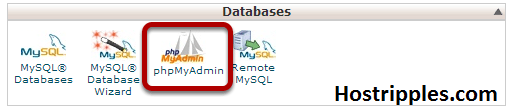
Click on the PHPMyAdmin Icon in your cPanel.
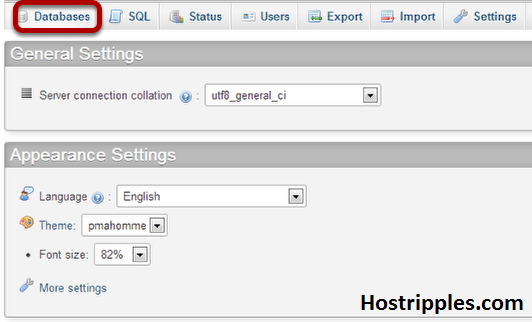
Select Databases at the top of the screen and then click on your WordPress database.
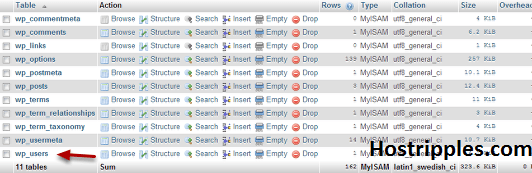
Click on the wp_users table.
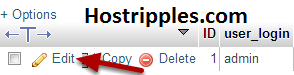
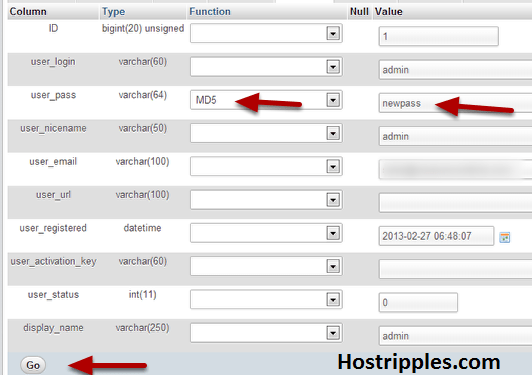
Click edit next to your WordPress admin username.
n the user_pass column, select MD5 and type in the new admin password. Hit GO when you are done.
Your wordpress admin password has been reset.
At HostRipples we’re proud to be the best WordPress hosting solution for our thousands of WordPress customers. If you ever have any issues with your WordPress site here at HostRipples please contact our customer support department 24 X 7 X 365.
The app development industry is evolving at an incredible pace. A decade ago, creating an application required extensive programming knowledge,…
Introduction to Cloud Hosting In today's digital world, website performance can make or break an online business. Whether you run…
In the world of digital marketing, getting attention is only half the battle. The real goal is to convince people…
Introduction In today's digital world, understanding website bandwidth is essential for anyone running a website. Whether you own a blog,…
Artificial intelligence is changing the tech world at lightning speed. From automated chatbots to AI-generated applications, many people are now…