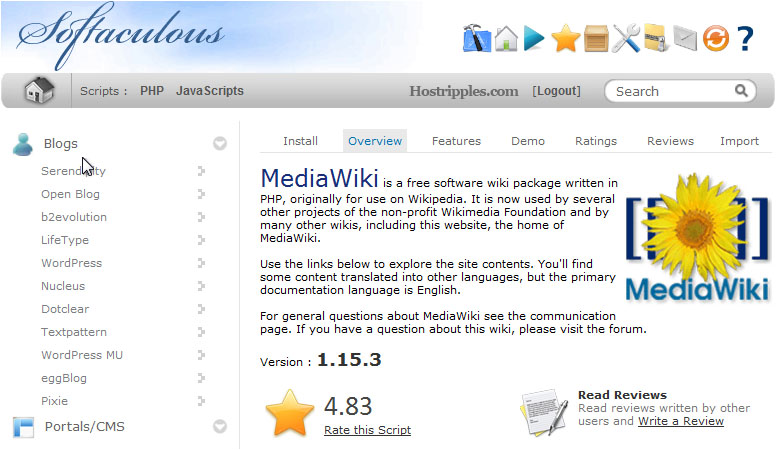
To Install MediaWiki from Softaculous
MediaWiki can easily be installed by using Softaculous in the cPanel Software / Services. This tutorial will explain how to install MediaWiki using Softaculous. Please follow the steps and install it.
Step 1 : Log into cPanel.
Step 2 : Find the Softaculous icon located in the Software Services section.
Step 3 : To locate MediaWiki you can either type mediawiki in the search box in the top right corner.
Step 4 : Click on Wikis in the left column.
Step 5 : When you click on the MediaWiki link, you will be taken to the home page for the MediaWiki package.
Step 6 : Click on the Install tab.
You will be asked to fill in the details of the installation.
Step 7 : If you have multiple domains associated with this account, you can select where to install it.
Step 8 : The next two boxes require a Directory and Database Name, neither of which should exist on the server.
Step 9 : Under Site config, enter a Wiki Name and Email.
These can be changed later on from the application’s admin panel.
Step 10 : Type the desired Admin Username and Password that should be used.
Step 11 : Click Install.
After a moment, the software will be installed.
Step 12 : Once finished, you can view your new site by clicking this link.
You will be able to access your newly-installed MediaWiki by following the links on the page.
That’s it! 🙂 🙂
The app development industry is evolving at an incredible pace. A decade ago, creating an application required extensive programming knowledge,…
Introduction to Cloud Hosting In today's digital world, website performance can make or break an online business. Whether you run…
In the world of digital marketing, getting attention is only half the battle. The real goal is to convince people…
Introduction In today's digital world, understanding website bandwidth is essential for anyone running a website. Whether you own a blog,…
Artificial intelligence is changing the tech world at lightning speed. From automated chatbots to AI-generated applications, many people are now…