How to create cron jobs on your Kloxo Panel
Kloxo is a free control panel for managing your VPS hosting or dedicated server hosting. Cronjob is scheduling a task to run later. The task can be either command or a script. The background process(daemon) behind the cronjob is the crond. In the /etc folder there is a file called crontab where we can write the command or name of the script that is to be executed at as per our customized time. By using the control panel we can manage the Cron-jobs simply.
Here I am explaining the steps for creating cron-jobs via Kloxo panel.
Step 1 : Login to your Kloxo control panel.
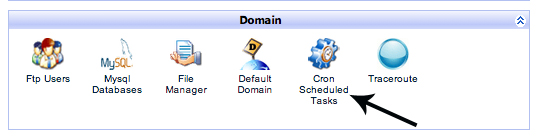
Step 2 : Click on “Cron Scheduled Task” under the Domain area, see the following screenshot:
Step 3 : There are two option in your Kloxo, Simple and Standard
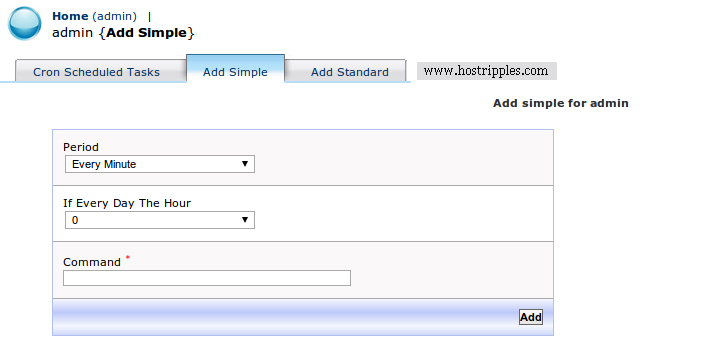
In simple section you can create simple cron jobs for every Minute, Hour or Day, see the following screenshot:
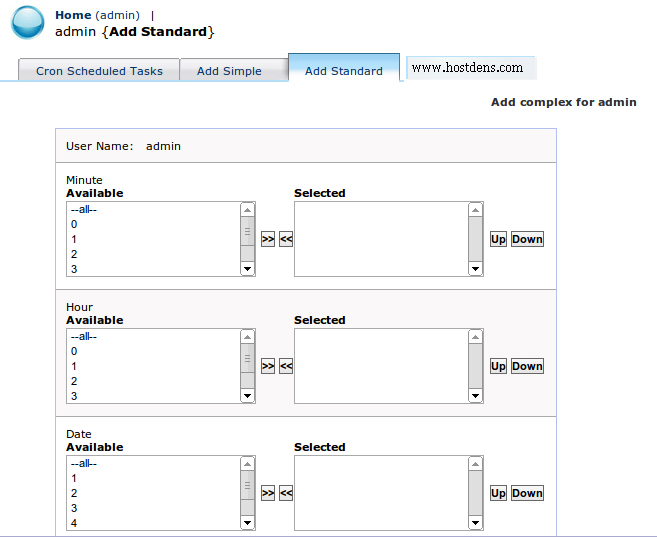
The standard section having the standard cronjob scheduling syntax.
You can create a standard Cron here, see the following screenshot:
That’s it!!
The app development industry is evolving at an incredible pace. A decade ago, creating an application required extensive programming knowledge,…
Introduction to Cloud Hosting In today's digital world, website performance can make or break an online business. Whether you run…
In the world of digital marketing, getting attention is only half the battle. The real goal is to convince people…
Introduction In today's digital world, understanding website bandwidth is essential for anyone running a website. Whether you own a blog,…
Artificial intelligence is changing the tech world at lightning speed. From automated chatbots to AI-generated applications, many people are now…